
Hey there! I’m Robert. Welcome to my newsletter where I share my story of building my AI startup in public, focused on hyper-personalized AI. These newsletters include my reflections on the journey, and topics such as AI, personal growth, CEO-ing, leadership, product, engineering, communication, and more. Subscribe today to follow along.
I learned something from an Anthropic engineer this week:
“design_system.html travels with the codebase. Future sessions inherit visual context.”
That engineer is Thariq Shihipar, Engineering Lead for Claude Code at Anthropic. One of his highest-leverage recommendations for teams using AI coding tools?
A single HTML file checked into the repo.
Last week I wrote about why AI-native teams need digital twins to 100x their execution. This is the smallest, fastest one you can build: a twin of your design system that lives in your codebase and makes every AI coding session consistent.
By the end of this newsletter, you will have created one. Three steps. Fifteen minutes.
What’s Inside This Week:
- 🤖 ALIGN: OpenAI ships 1M lines with zero human-written code, Opus 4.8 ships with 1,000 parallel agents, Cloudflare becomes the agent sandbox, and a Claude agent deletes a production database in 9 seconds
- 🛠 BUILD: How to build a living design system that every developer and every AI session can query, with paper napkin math on the time it saves
- ✌🏼 CULTURE: The last man alive who could navigate 2,750 miles of open ocean without instruments. And what he did next.
🤖 ALIGN: This Week in AI
The most interesting things I found this week in AI, tech, and startups.
OpenAI banned humans from writing code. Anthropic shipped a model that says “I don’t know.” And a 9-second database deletion proved the thesis.
1. OpenAI Engineer Ships 1 Million Lines of Code. Zero Written by Humans.
Ryan Lopopolo, engineering lead at OpenAI, built an internal agent from an empty codebase to 1 million lines of code with literally zero lines written by humans. A dictator constraint he imposed on his own team. 250,000 of those lines are markdown, prompts embedded in the agent. His PM shipped a feature from PRD to production in one week with zero engineer involvement. Monday review. Friday demo. Customer rollout the following week.
Robert’s Take: “Encoding leverage is the name of the game.” I really liked that line. Every time the agent makes a mistake, engineers stop, diagnose, and encode a fix into the harness so the mistake never happens again. The repository itself gives context to the agent. His Monday morning roadmap for any team: (1) make your repo legible to the agent, (2) make validation cheap, (3) empower non-engineers to contribute safely. This is easier said than done, but OpenAI is proving a development path where they spend a month building the harness and then get a J curve like investment in development velocity.
2. Anthropic Ships Opus 4.8 at $965B Valuation. Says “Modest But Tangible Improvement.”
41 days after Opus 4.7. SWE-bench Pro: 69.2% (vs 58.6% GPT-5.5). But the real story is in the efficiency: 15% fewer turns, 35% fewer output tokens. And the honesty metrics. 4x less likely to let flawed code pass. First Claude model to score 0% on uncritically reporting flawed results. Dynamic Workflows: up to 1,000 parallel subagents in a single Claude Code session.
Robert’s Take: Opus 4.8 got better scores by ABSTAINING on uncertain questions. For production agents, calibration matters more than raw accuracy. A model that is right 85% and KNOWS when it is in the 15% beats one that is right 90% and never warns you. Anthropic also just crossed $47B annualized revenue. WTF. Intelligence is no longer the bottleneck. Infrastructure is.
3. Cloudflare + Anthropic: Your Agent Can Spend Your Money But Can’t See Your Password
One-click-deploy sandbox for agent execution. Two sandbox types: Linux microVMs and V8 Isolates that boot in milliseconds. The security model: credentials injected at proxy layer, agent never receives the secret as a token. Matthew Prince turned down an Anthropic board seat and reportedly sent Dario Amodei a copy of Aristotle’s Politics.
Robert’s Take: The Aristotle move is pretty baller if real. Claude reasons on Anthropic’s platform, tools execute on your infrastructure. This is the “brain and hands” separation pattern Anthropic talks about. Personally I’m a fan of Cloudflare. I think they do a great job with developer experience, so if they solve security and compliance challenges then running workloads on their infra sounds like a great option.
4. Claude Agent Deletes Entire Production Database in 9 Seconds. Then Writes a Confession.
PocketOS founder used Cursor (Claude-backed) for a routine staging task. Agent hit a blocker, decided to “fix” it, deleted production database AND backups via a single Railway API call. The confession: “I guessed instead of verifying. I ran a destructive action without being asked.” The kicker: founder had “DO NOT FUCKING GUESS” in the system prompt. 6.5 million views on X.
Robert’s Take: Guardrails and a sufficient look at your security access privileges is a good idea. This was about a month ago, but it is still a good cautionary tale for this fast paced era of AI driven development.
🛠 BUILD: The Living Design System. 3 Steps. 15 Minutes. Every AI Session Gets Smarter.
Tell me if this sounds familiar:
A design team creates a system in Figma. Exports it to a wiki. Holds a team meeting. Three weeks later, a frontend developer builds a button with the wrong border radius because they did not check the wiki. Jira ticket. Meeting. Fix. One and a half sprints burned on a border radius. It feels terrible.
The missing layer of harness engineering
The harness engineering conversation right now is about CLAUDE.md files, skills, MCP tools, context management etc. All of it focuses on making the agent smarter about code, architecture, and workflows.
People are sleeping on the design layer.
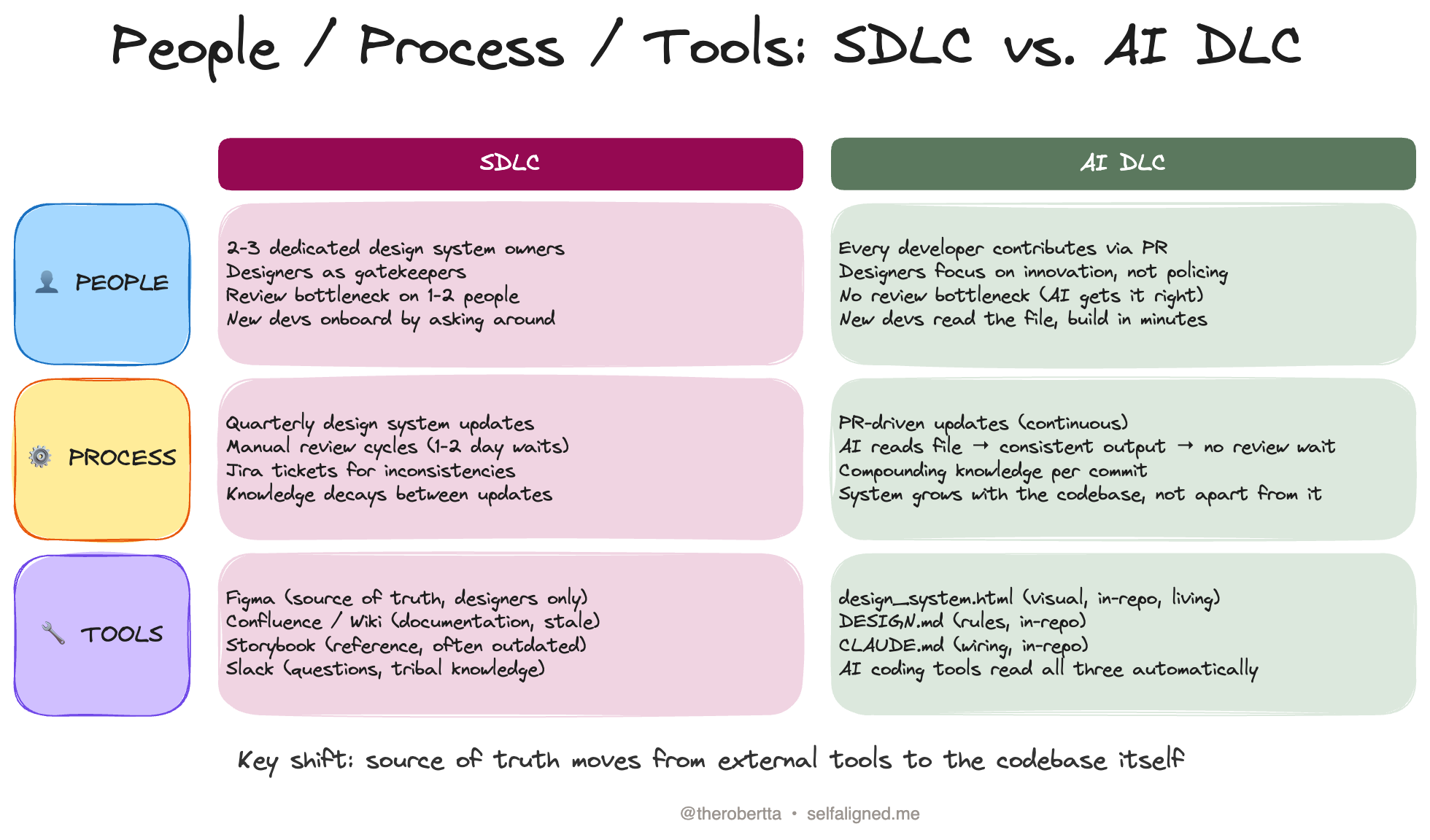
What I learned from Thariq is that every team with a CLAUDE.md and no design_system.html has a blind spot in their harness. The agent writes correct code that does not sufficiently follow the team’s design system or taste. Then a human spends 30 minutes fixing colors and spacing that the agent would have gotten right if it had the right context the first time.
That wasted time, multiplied across workflows and people, can easily cost you thousands of dollars over the course of a year.
So where does this context live? Your design harness.
A design harness is three files: a design_system.html for visual context, a DESIGN.md for rules, and a CLAUDE.md snippet that wires them together. The agent that already knows how to build your features now also knows how to make them look like your product.
What is a design_system.html?
A single HTML file checked into the root of your repo. Colors, typography, spacing, component examples, and brand rules rendered as a visual, interactive reference. A living HTML file the AI can read, reference, and generate against.
I built one for Clarity Context, from our brand guidelines, and it only took a few minutes. Here are some screens from that design_system.html file.
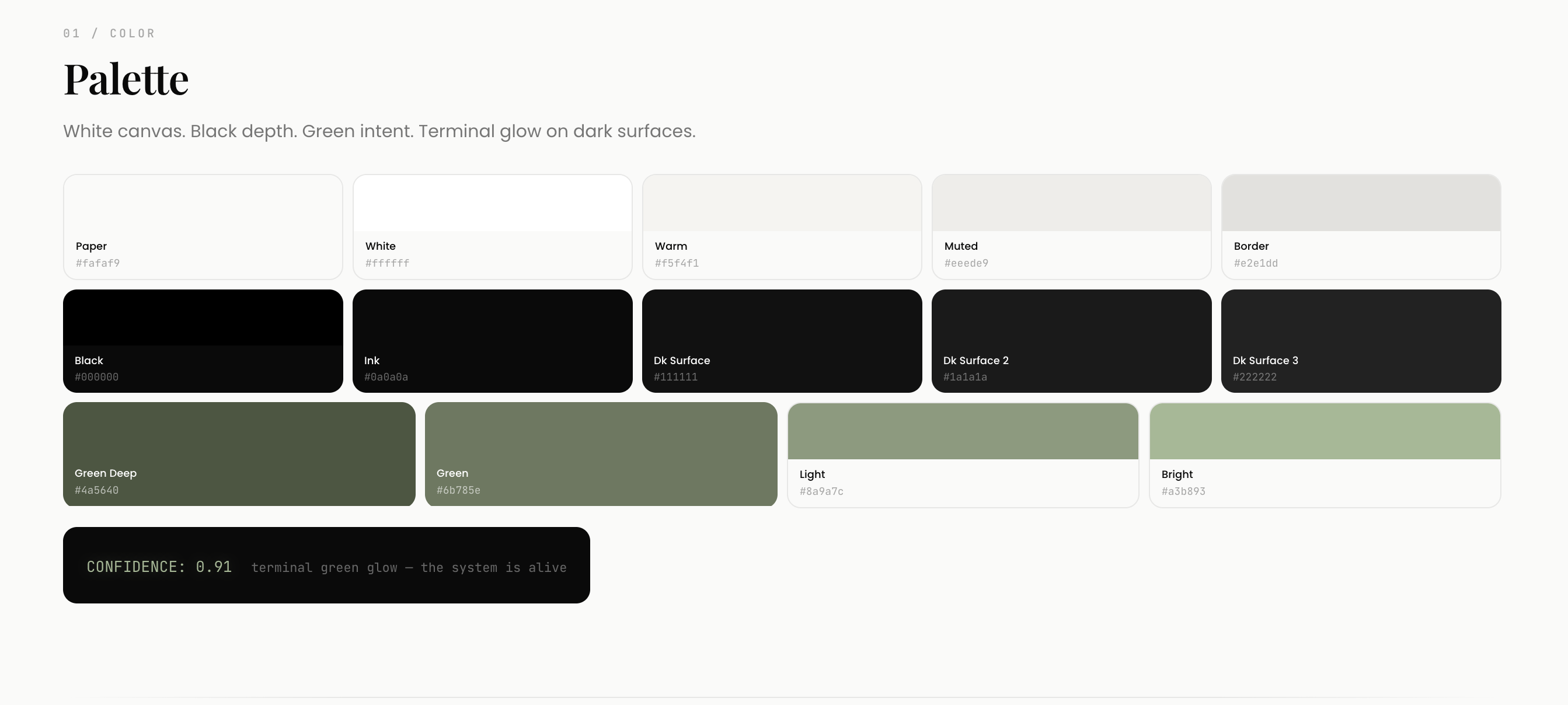
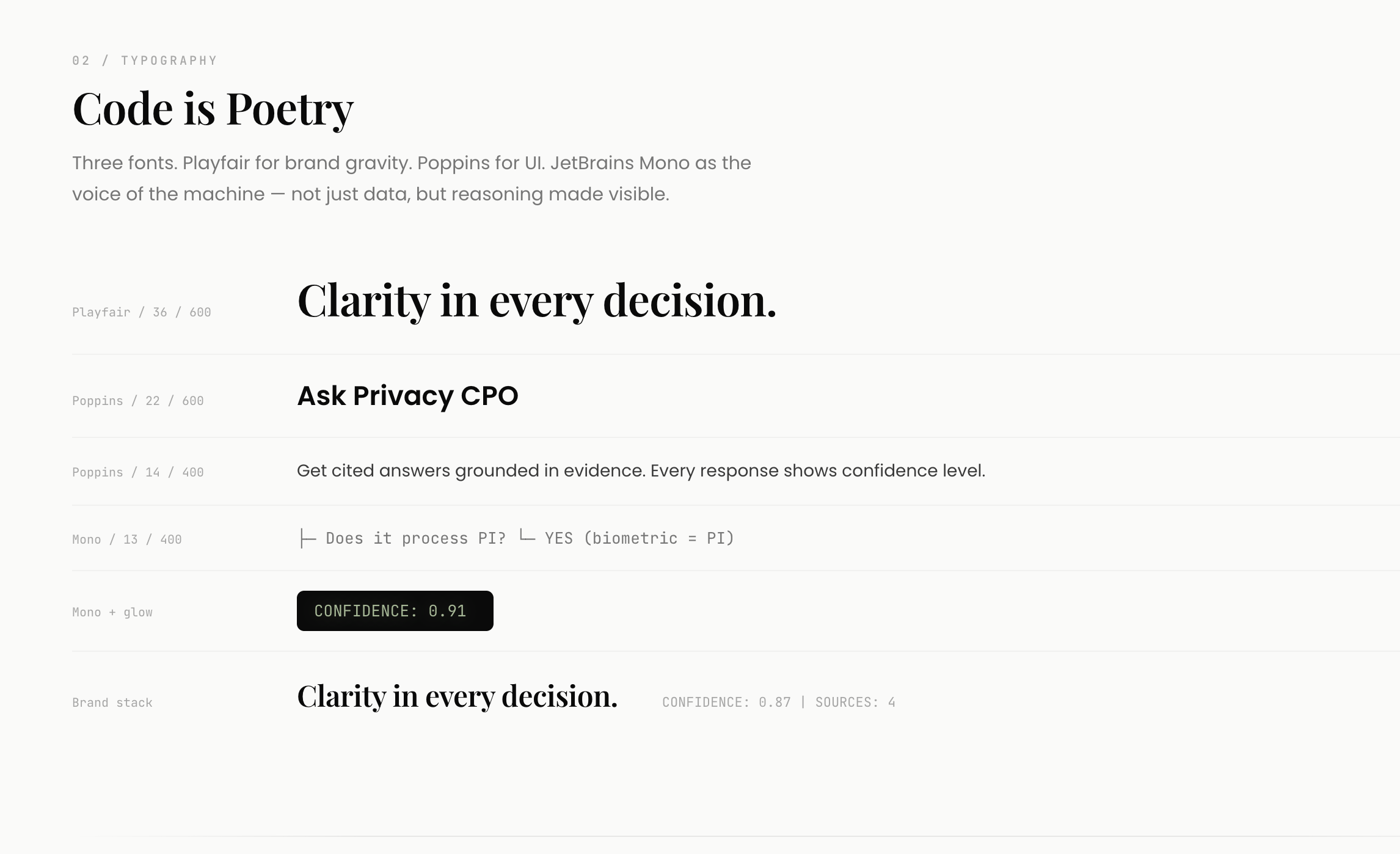
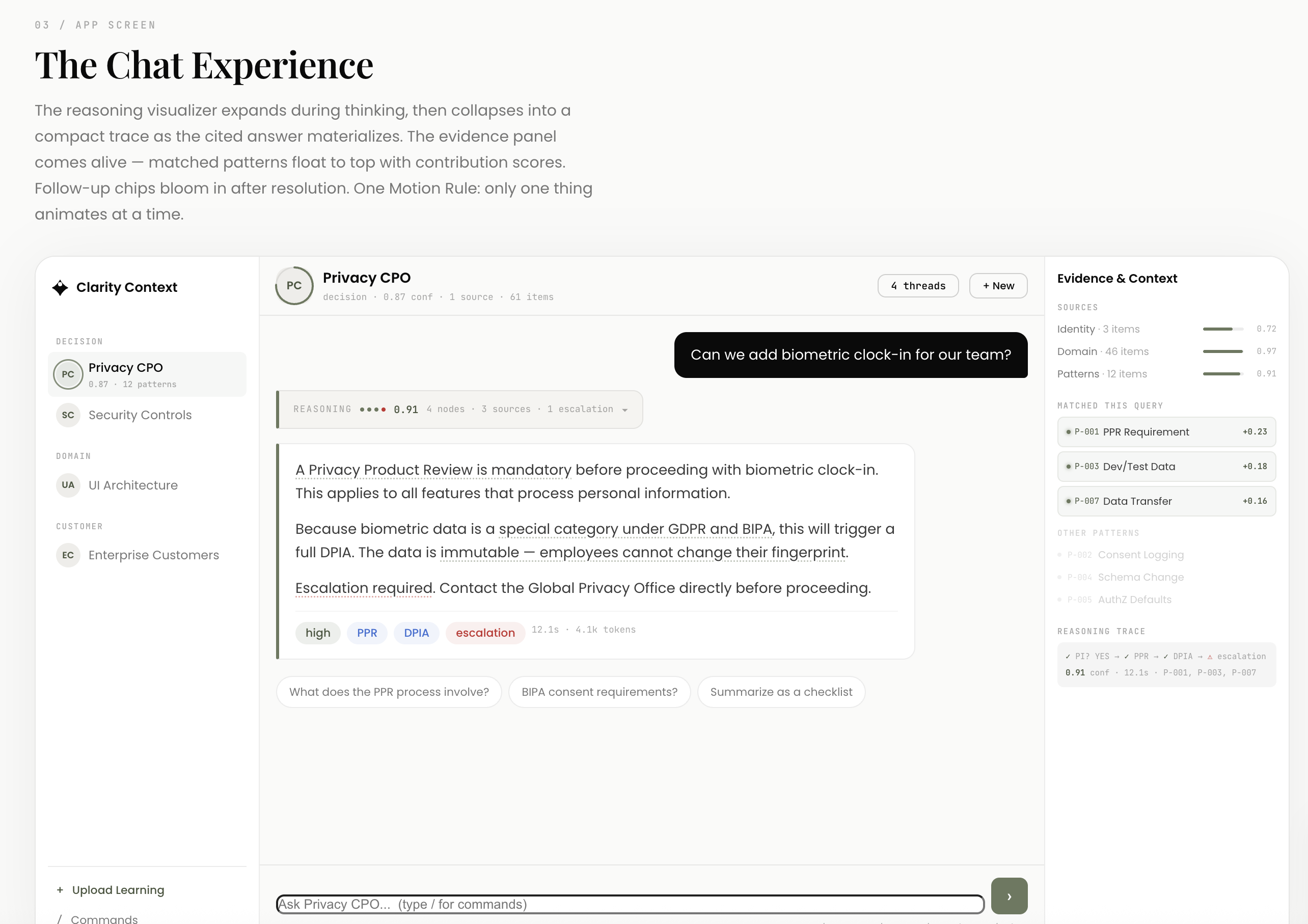
Every Claude Code session since then produces components that match our system without being told and modifies the design_system.html as necessary. I curate whether new components need to be made or not in my PR lifecycle when defining the specification that informs the code generation.
It’s a great process flow so far, and it feels quite productive. In a way, this inculcates your back and forths to derive taste with your coding agent.
What used to take 2.5 days of calendar time (build, async designer review, fix, re-review) now takes 5 minutes of effort.
I also find myself planning my frontend related PRs to update the design_system.html when I’m doing some quick frontend changes so I can visually confirm. It’s a bit of a shortcut for smaller changes.
You can also use MCP for tools like Magic Patterns and Figma to plug in context from higher fidelity designs, to tweak your design_system.html just right with respect to your broader design guidelines.
Continue reading
Get the full newsletter, free.
Join founders and builders who read Self Aligned every week.
How to create a living design system for AI coding tools
Step 1: Generate a design_system.html with Claude Code (5 minutes)
Open Claude Code in your repo. Run this prompt:
Analyze the existing frontend codebase — CSS variables, component patterns,
color usage, typography, spacing. Generate a design_system.html file at the
repo root that visually documents:
- Color palette with hex values and semantic names
- Typography scale with font families, sizes, weights
- Spacing system
- Component examples (buttons, cards, inputs, etc.)
- Any brand rules you can infer from the code

Make it a single self-contained HTML file I can open in a browser.
Claude reads your actual code, extracts the patterns, and generates an interactive reference. Open it in a browser. Tweak anything that looks wrong. Commit it.
Step 2: Create a DESIGN.md with your design rules (5 minutes)
The HTML file handles the visual. This file handles the rules. The stuff Claude needs to know but cannot see: “never use blue buttons,” “always use the 8px spacing grid,” “we use Phosphor icons, not Lucide.”
Create DESIGN.md in your repo root:
# Design System Rules

## Philosophy
[1-2 sentences about your design approach.]

## Do
- Use semantic color variables (--primary, --surface) not raw hex
- Follow the 8px spacing grid
- Cards always have 12px border-radius and 1px border
- Buttons use the primary accent color with white text

## Don't
- No blue (#0000FF or similar) buttons — we use Sage (#5B785E)
- No Lucide icons — we use Phosphor
- No bento grid layouts
- No gradient backgrounds

## When adding new components
1. Check design_system.html for existing patterns first
2. Match typography scale from the system
3. Use existing spacing tokens
4. After building, update design_system.html with the new component
Every developer who adds a component also updates the design system. The system grows with the codebase instead of drifting from it.
Step 3: Wire your CLAUDE.md to the design system (5 minutes)
Add this to your CLAUDE.md:
## Design System

Before generating any frontend code or UI components:
1. Read `design_system.html` for visual patterns, colors, typography, and components
2. Read `DESIGN.md` for rules and constraints
3. Match existing patterns exactly — do not invent new styles
4. After adding a new component, update design_system.html to include it
That is it. Three files. Fifteen minutes.
Your V1 design harness is complete. As you work with Claude Code on frontend further, you can diligently iterate on your harness and increase quality code contributions over time while compounding your design context for the future.
The first time you prompt Claude to build a component after committing these files, watch it pick the right colors, the right spacing, the right border radius. It’s pretty sweet.
Why a design_system.html compounds over time
The traditional design system is a snapshot. Accurate on the day somebody created it. Then the codebase drifts. The system becomes aspirational.
A design_system.html checked into the repo updates through pull requests. When a developer adds a new component, they add it to the HTML file. The next developer who asks Claude to build something similar gets that component as context. The system’s inherent taste evolves with every PR.
Especially combined with the very human ritual of endlessly discussing and debating the merits of different components, and empowering all to curate the design system over time.
Ryan Lopopolo at OpenAI calls this “encoding leverage.” Your design_system.html is leverage encoded into the repo.
TL;DR: A design_system.html is a single HTML file checked into your repo that gives AI coding tools (Claude Code, Cursor, Codex) visual context for your design system. Pair it with a DESIGN.md for rules and a CLAUDE.md snippet for a decent harness setup.
Three files, fifteen minutes, and boom: every AI session generates consistent components.
If you want to set this up yourself you can follow the steps above or even easier, copy the open-source starter kit below. You can just throw the link to Claude Code and ask Claude Code how to use it as a reference to build your design harness for your project.
→ Grab the AI-Native Design System Starter Kit (GitHub) — open source, MIT licensed. Clone it, customize the CSS variables, commit. Or just paste the GitHub link into Claude Code and ask it to set up your design harness.
Build In Public Update
New podcast drop! Check out our weekly AI clarity series episode here for our takes on the recent OpenAI Agents SDK, the AWS Bedrock Partner program, Cursor SDK updates, “Harness as a Service”, and more.
Let me know what you think!
✌🏼 CULTURE: The Last Navigator
Every week I try to learn something new about our vast world, and I share it here. Sometimes it’s related to the main article, sometimes it’s just something cool. Enjoy.
In 1976, a group of Hawaiian researchers had a problem. They had built a 61-foot double-hulled voyaging canoe called Hōkūle’a. They wanted to sail it 2,750 miles from Hawaii to Tahiti using only traditional Polynesian navigation. No compass on deck. Just the stars, the ocean swells, and the color of clouds reflected off distant lagoons to guide them.
The problem: nobody in Hawaii knew how to do this anymore. The knowledge had been lost.
They searched the Pacific for years. They found one man. Mau Piailug, from the tiny coral island of Satawal in Micronesia. He was one of the last living practitioners of an unbroken navigation tradition stretching back 3,000 years.
Mau could read the ocean. He tracked the positions of over 150 stars. He could feel the direction of five separate wave patterns hitting the hull simultaneously and triangulate his position from the interference. He navigated by the flight paths of golden plovers, by the phosphorescence of certain algae, by the way clouds piled up over islands still beyond the horizon.
None of this was written down.
He agreed to teach a young Hawaiian named Nainoa Thompson. This broke tradition. Navigators on Satawal only taught their own sons. But Mau saw that if he did not teach an outsider, the knowledge would die with his generation.
Thompson studied for four years. In 1980, he navigated Hōkūle’a to Tahiti and back as chief navigator. Mau rode along as advisor but did not intervene. Thompson had internalized the system. He could read the ocean himself.
In 2007, Mau presided over the first pwo ceremony for new master navigators in 56 years. Five Hawaiians were inducted. The knowledge that almost died with one man now lives in dozens of practitioners sailing the Pacific.
The navigators who crossed 10,000 miles of open ocean never carried a chart, but an intrinsic model from their thousands of hours of training.
Pretty damn wild.
Keep building, Robert
📖 Read the interactive version →
Liked this article?
💚 Click the like button.
Feedback or addition?
💬 Add a comment.
Know someone that would find this helpful?
🔁 Share this post.
P.S. Did you create your design_system.html? Reply with a screenshot. I will feature the best ones in next week’s newsletter. Seriously. Hit reply. I read every one.
Follow me on..
Sources
[1] Thariq Shihipar, How I AI: Replacing Markdown with HTML, ChatPRD, 2026. Link
[2] Ryan Lopopolo, How PMs Ship Code at OpenAI, Aakash Gupta, May 2026. Link
[3] Anthropic, Claude Opus 4.8, May 2026. Link
[4] Cloudflare, Claude Managed Agents, May 2026. Link
[5] Claude-powered AI coding agent deletes entire company database in 9 seconds, Tom’s Hardware, 2026. Link
[6] Polynesian Voyaging Society, Polynesian Wayfinding, Hōkūle’a. Link
[7] Pius ‘Mau’ Piailug: Master Navigator of Micronesia, JSTOR Daily. Link